

CHROME EXTENSION
Universal AI Extension
FEATURES
主な機能
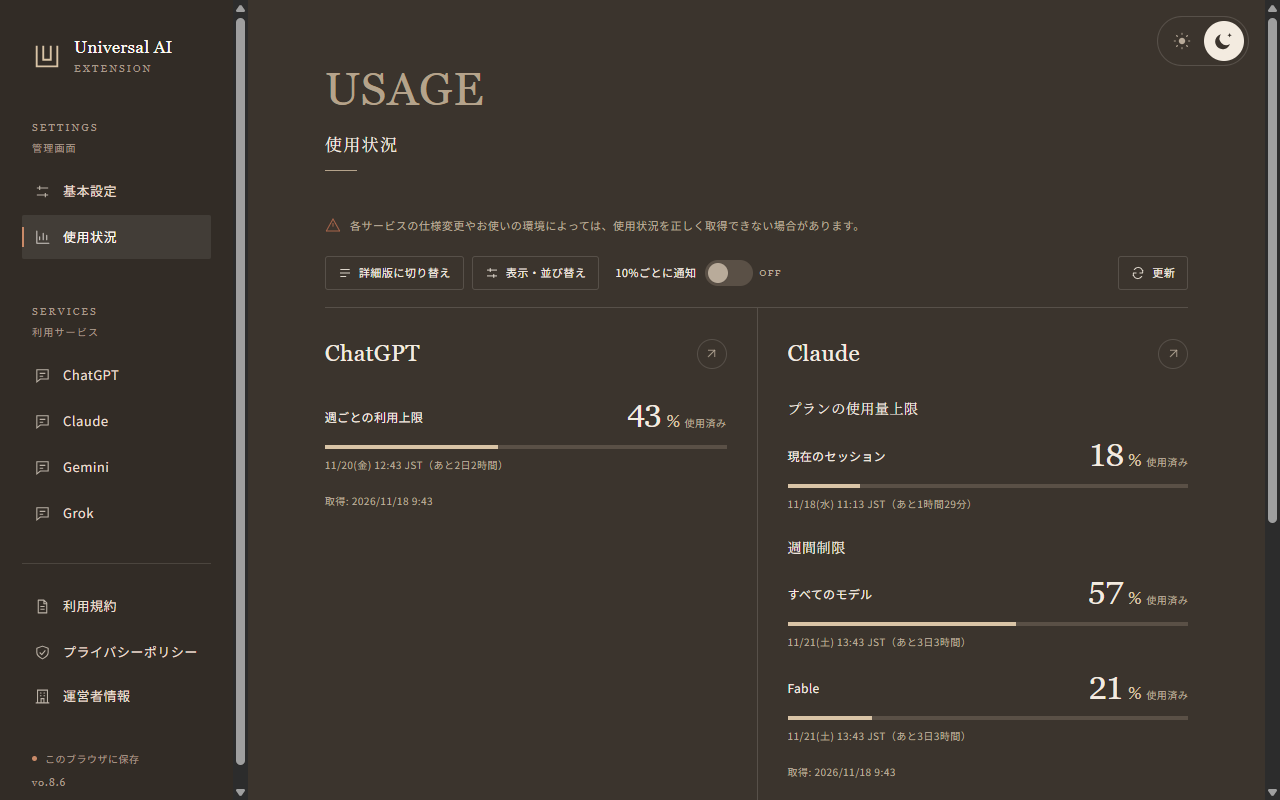
4サービスの使用状況
使用率、リセットまでの時間、取得できるクレジット残高をまとめて確認できます。表示するサービスを選び、使用率の通知も設定できます。
プロジェクトの並び替え
ChatGPTとClaudeで、ドラッグやキーボードを使ってプロジェクトの順番を変えられます。名前順や更新日順にも切り替えられます。
メニューの表示を調整
ChatGPTの探索メニューの項目をナビゲーションに表示できます。4サービスの識別できる共有ボタンやメニュー項目も非表示にできます。
DETAILS
対応環境とデータの取り扱い
対応環境
Google Chrome 111 以降
ChatGPT・Claude・Gemini・Grok のブラウザ版
データの取り扱い
使用状況の取得には、各サービスの既存のログイン状態を使います。設定と取得した使用状況はChrome内に保存します。会話の本文や入力中の内容は取得しません。
Studio Attraitが提供する非公式の拡張機能です。取得できる項目はサービスや利用環境によって異なります。
プライバシーポリシー
対象と運営者
本ポリシーはUniversal AI Extensionに適用します。 提供元はStudio Attraitです。
ブラウザ内で参照する情報
ChatGPTのプロジェクトID・名前とメニュー項目、ClaudeのプロジェクトID・名前・更新日時を参照します。 ChatGPT・Claude・Gemini・GrokのページURL、共有操作のラベルと画面構造を、共有リンク作成のボタン・メニュー項目を非表示にするために参照します。 プロジェクトの並び替え・メニュー表示・対応画面の判定のため、ページURLと画面構造も参照します。 ChatGPT・Claude・Gemini・Grokの使用率、次回リセット時刻、クレジット残高を、各サービスのWebサイト内部APIから取得します。 同じChromeプロファイルのログイン状態を利用し、Chrome起動中に約1分ごと、または「更新」を押したときに確認します。 表示中の使用状況ページから、取得できる数値、リセットの枚数と有効期限を読み取る場合もあります。 全体または対象サービスをOFFにしている間は取得を停止し、自動ログインや使用状況ページの自動表示は行いません。 認証にはブラウザの既存セッションを利用します。 ChatGPTの短期アクセストークンとClaudeの組織IDは通信処理中のメモリでのみ使用し、保存・記録したり運営者へ送信したりしません。 会話本文・入力内容は取得せず、アカウント識別情報や認証情報は拡張機能の保存領域に保存しません。
保存する情報
機能のON/OFF、表示言語、配色(ライト/ダーク)、プロジェクトIDの手動順と並び順の設定を、このブラウザの拡張機能用領域に保存します。 サービス別に最後に取得した使用状況と取得時刻、簡易版・詳細版の選択、サービスの並び順も、同じChromeプロファイルの拡張機能用領域に保存します。 管理画面で選択したページはタブ内に保持します。 開発者のサーバーへの保存や、別端末への同期は行いません。 プロジェクト名と更新日時は処理中だけ参照し、拡張機能の保存領域には保存しません。 更新の結果、エラーの種類、試行時刻も保存します。 一時的な取得失敗では最後に取得できた値と取得時刻を残し、エラーを表示します。 認証切れ、確認できたアカウントや組織の切り替え、Chromeの新しいセッションでは、該当する使用状況と通知基準を消去します。 ChatGPTとClaudeの切り替え判定に使うハッシュは、Chromeを開いている間だけセッションメモリに保持します。 API応答の全文は保存しません。 通知のON/OFFと、サービス・利用枠ごとの通知済みの10%区分、リセットを識別する目印も、このブラウザ内に保存します。 通知の配信結果(Chromeによる受理・ブロック・失敗)、試行時刻、通常通知かテストかの区分もブラウザ内に保存します。 OSからのエラー全文は保存しません。
外部通信と表示言語
使用状況の確認では、chatgpt.com、claude.ai、gemini.google.com、grok.comへ直接通信します。 運営者や第三者への利用データ送信、アクセス解析、追跡、IPアドレスによる国判定は行いません。 運営者情報の表示にはブラウザの優先言語だけを使います。 管理画面用のフォントと画像は拡張機能に同梱し、一部の文字には端末のフォントを使用します。 ChatGPTのメニューアイコンには、ChatGPTの画面上にあるアイコンを利用します。 公式サイトのリンクは、クリックしたときだけ開きます。 リンク先での通信や情報の取り扱いには、そのサイトのポリシーが適用されます。
利用目的と第三者提供
参照・保存する情報は、説明した拡張機能の動作にだけ使用します。 運営者への送信、第三者への提供・販売、広告配信や信用評価への利用は行いません。 Chromeウェブストアのユーザーデータポリシー(Limited Useの要件を含む)に従います。
使用率の通知
通知は初期状態でOFFです。 ONにすると、取得に成功した使用率が10%刻みの区切りを超えた場合に、WindowsまたはmacOSの通知機能でお知らせします。 通知のために外部サーバーへデータを送信しません。
データの削除
拡張機能をアンインストールすると、拡張機能用領域に保存したデータは削除されます。 機能をOFFにするだけでは、保存した設定や並び順、取得済みの使用状況は削除されません。
最終更新日: 2026-11-18
Scope and operator
This policy applies to Universal AI Extension, provided by Studio Attrait.
Information accessed in your browser
The extension accesses project IDs, names and menu items in ChatGPT, and project IDs, names and update timestamps in Claude. The extension also reads page URLs, sharing control labels and page structure on ChatGPT, Claude, Gemini and Grok to hide buttons and menu items that create share links. It also accesses page URLs and page structure to sort projects, display navigation and detect supported screens. The extension reads usage percentages, next reset times and credit balances from the internal website APIs of ChatGPT, Claude, Gemini and Grok. It uses the signed-in session in the same Chrome profile and checks about once a minute while Chrome is running, or when you select Refresh. It may also read available numbers, reset counts and expiry dates from an open usage page. Collection stops while the extension or the corresponding service is off. It does not sign in or open usage pages automatically. Authentication uses the browser’s existing session. The short-lived ChatGPT access token and Claude organization ID are used only in memory during requests, never saved, logged or sent to the operator. Conversation text and typed content are not read. Account identifiers and authentication information are not saved in extension storage.
Stored information
Feature switches, display language, color theme (light or dark), manual project ID order and sorting preferences are stored in this browser’s extension storage. The latest usage values and capture time for each service, the simple or detailed view and the service display order are also saved in extension storage within the same Chrome profile. The selected settings page is kept within its tab. Data is not stored on developer servers or synced across devices. Project names and update timestamps are accessed only during processing and are not saved in extension storage. Refresh results, error categories and attempt times are also stored. A temporary refresh failure retains the last successful values and capture time and shows an error. The affected usage history and notification baselines are cleared when authentication expires, an account or organization change is detected, or a new Chrome session begins. Hashes used to detect changes for ChatGPT and Claude are kept in session memory while Chrome is open. Full API responses are not stored. The notification on/off preference, the last notified 10-percentage-point bucket and reset markers for each service and quota are also stored locally in this browser. Notification delivery results (accepted, blocked or failed), attempt times and whether the request was a threshold notification or a test are also stored locally. Full operating-system errors are not stored.
Network access and language
Usage checks communicate directly with chatgpt.com, claude.ai, gemini.google.com and grok.com. Usage data is not sent to the operator or other third parties. The extension does not run analytics or tracking, or look up countries using IP addresses. Operator information is shown based only on the browser’s preferred language. Fonts and images used by the settings page are bundled with the extension; system fonts are used for some characters. ChatGPT menu icons are reused from the ChatGPT page. The official website link opens only when clicked. The destination site’s policies govern subsequent connections and information handling.
Purpose and sharing
Accessed and stored information is used only for the described extension features. It is not sent to the operator, shared or sold to third parties, or used for advertising or credit assessments. We comply with the Chrome Web Store User Data Policy, including the Limited Use requirements.
Usage notifications
Notifications are off by default. When enabled, successfully fetched usage crossing a 10-percentage-point threshold triggers a Windows or macOS system notification. No data is sent to an external server for notifications.
Deleting data
Uninstalling the extension deletes data in its extension storage. Turning a feature off does not delete saved settings, project order or captured usage values.
Last updated: 2026-11-18