

CHROME EXTENSION
Slack Workspace Rail
FEATURES
主な機能
ワークスペーススイッチャー
ブラウザ版Slackの左側に一覧が表示され、ログイン済みのワークスペースをクリックして切り替えられます。
フォルダ作成
ワークスペースのアイコンを別のアイコンの上へドラッグすると、フォルダを作れます。仕事用と個人用など、用途ごとにまとめられます。
ドラッグで並び替え
ワークスペースやフォルダをドラッグして、よく使うものから順に並べられます。
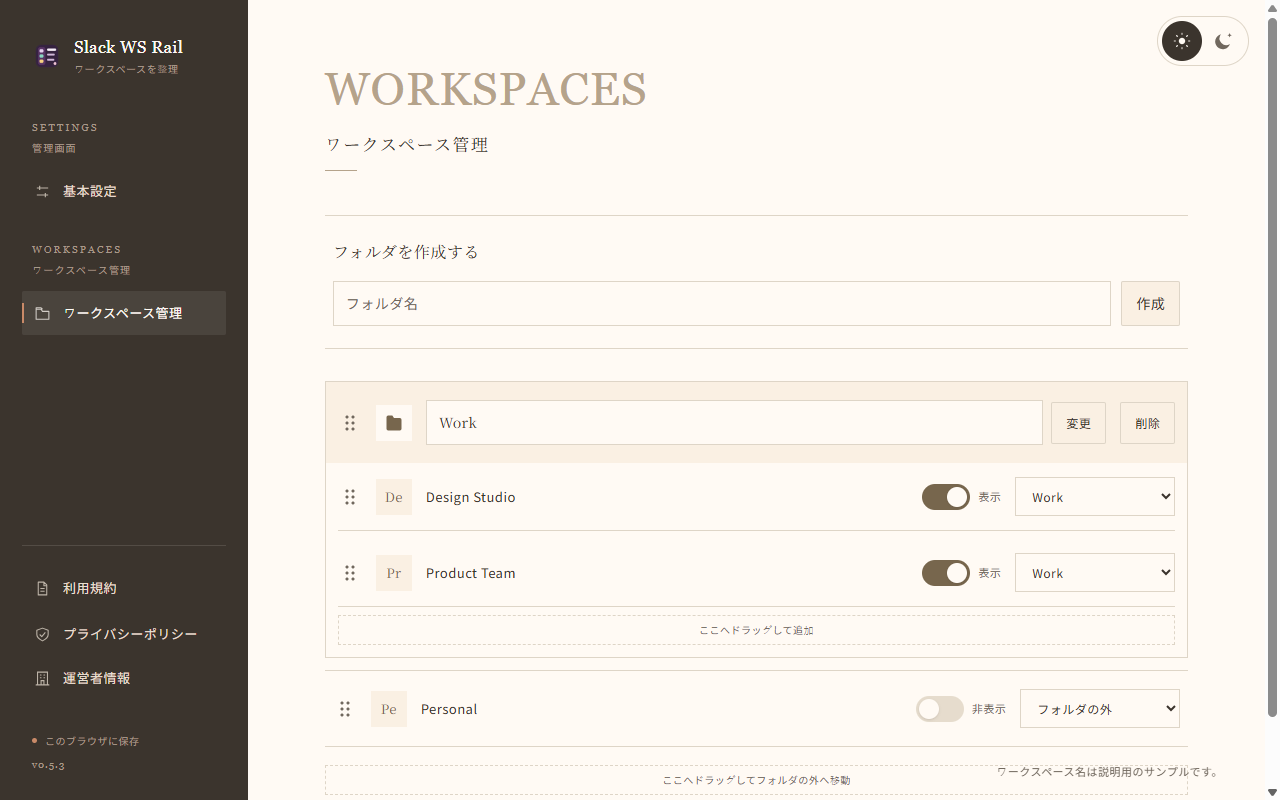
管理画面で整理
フォルダ名、所属先、並び順、表示・非表示をまとめて変更できます。非表示のワークスペースに未読がある間だけ表示する設定も選べます。
DETAILS
対応環境とデータの取り扱い
対応環境
Google Chrome 111 以降
ブラウザ版 Slack(app.slack.com)
データの取り扱い
ワークスペースの並び順、フォルダ構成、表示設定はChrome内に保存します。メッセージ本文やCookie、認証情報は取得しません。
Studio Attraitが提供する非公式の拡張機能です。Slackの画面構造が変わると動作に影響する場合があります。
プライバシーポリシー
最終更新日: 2026年11月16日 / 対象: v0.5.3
目的と動作
Slack Workspace Railは、ブラウザ版Slackのワークスペースをフォルダ・並び順・表示設定で整理する非公式Chrome拡張機能です。
https://app.slack.com/* のトップフレームで、ページから見えるUser-AgentへChrome OSの表示条件を追加します。HTTPのUser-Agentヘッダーは変更しません。起動時・拡張全体をONにしたとき、標準一覧が閉じていれば標準表示ボタンを一度だけ押します。切り替えはSlack標準のボタンへ処理を渡します。
端末内で処理・保存する情報
ブラウザのUser-Agent、標準一覧と表示ボタンの状態、ワークスペースID・名前・アイコン・選択状態・未読表示を端末内で利用します。User-Agentは個人の識別やフィンガープリントには使いません。メッセージ本文、認証情報、Cookie、閲覧履歴、利用者の操作履歴は読み取りません。
ワークスペースID・名前、所属フォルダ、並び順、表示設定、フォルダ名・開閉状態、拡張全体と整理機能のON/OFF、非表示時の未読設定、表示言語、管理画面の配色を拡張専用のchrome.storage.localに保存します。同じChromeプロファイル内で利用し、クラウド同期は行いません。未読・選択状態・アイコンは保存しません。ワークスペースが一時的に一覧から消えても、整理設定は保持します。
ワークスペース名・利用者が作成するフォルダ名には、個人名が含まれる場合があります。クリック、ドラッグ中のポインター座標、並び替えのキー入力は、利用者が指定した整理操作の実行中だけ処理します。操作履歴として記録したり、解析・送信したりしません。
起動時・拡張全体をONにしたときの一覧自動表示の待機は、それぞれ最大30秒です。整理機能では標準一覧周辺を継続監視し、一覧自体の置き換えも確認します。メッセージ本文の監視は行いません。
通信・第三者提供
独自の送信サーバー、Slack API、外部スクリプト、広告、分析・追跡は利用しません。保存設定を開発者や第三者へ送信しません。アイコン表示にはSlackが読み込んだ画像URLを再利用します。ブラウザのキャッシュ状況によっては、Slackの画像サーバーへの画像読み込みが発生する場合があります。
運営者情報の表示にはブラウザの優先言語だけを使い、IPアドレスによる国判定は行いません。フォントと運営者ロゴは拡張内に同梱します。運営者の公式サイトはリンクをクリックしたときだけ開き、リンク先での通信や情報の取り扱いには、そのサイトのポリシーが適用されます。
データの販売・目的外利用・第三者提供、信用力の判断や融資判断への利用は行いません。Chromeウェブストアのユーザーデータポリシー(Limited Useの要件を含む)に従います。
Slack本体の通常通信とデータ処理は引き続き発生し、Slack自身の規約とプライバシーポリシーに従います。拡張による非表示は、Slack本体の通知設定や参加状態を変更しません。
権限・無効化・削除
対象サイトへのアクセスと、設定保存のためのstorage権限を使用します。tabs、scripting、cookies、webRequestの権限は要求しません。管理画面を開く操作とタブへの設定変更通知にChromeの拡張機能APIを使います。
管理画面で整理機能をOFFにすると標準一覧へ戻り、保存設定は保持します。全体OFFではスイッチャー・標準一覧・整理用一覧を非表示にし、ページから見えるUser-Agentを元に戻します。一覧の自動表示と整理用の監視・収集も停止します。再開のための設定変更の受信を維持します。Chromeの拡張機能管理画面から拡張自体を無効化した場合は、Slackタブの再読み込みで拡張の処理が取り除かれます。保存データは拡張をアンインストールすると削除されます。
公開者・問い合わせ
公開者: Studio Attrait
問い合わせ時に利用者自身が送信する情報は、その問い合わせへの回答のために取り扱います。パスワード、認証トークン、メッセージ本文などの機密情報は送らないでください。
変更
動作や情報の取り扱いを変更する場合は、このポリシーも更新します。
Last updated: November 16, 2026 / Applies to: v0.5.3
Purpose and operation
Slack Workspace Rail is an unofficial Chrome extension that organizes workspaces in browser-based Slack using folders, ordering and visibility settings.
In the top frame of https://app.slack.com/*, it adds a Chrome OS indicator to the User-Agent value visible to the page. It does not change the HTTP User-Agent header. At startup and when the extension’s main switch is turned on, it clicks Slack’s native display button once if the native workspace list is closed. Workspace switching is delegated to Slack’s native buttons.
Information processed and stored on your device
The extension uses the browser’s User-Agent, the state of the native workspace list and its display button, and workspace IDs, names, icons, selection state and unread indicators locally on your device. The User-Agent is not used to identify individuals or for fingerprinting. The extension does not read message bodies, authentication information, cookies, browsing history or your interaction history.
The extension stores workspace IDs and names, folder membership, ordering, visibility settings, folder names and expanded/collapsed states, the on/off settings for the extension as a whole and its organization feature, the unread behavior for hidden workspaces, display language and settings-page color theme in its own chrome.storage.local area. This information is used within the same Chrome profile and is not synchronized to the cloud. Unread indicators, selection state and icons are not stored. Organization settings are retained even if a workspace temporarily disappears from the list.
Workspace names and user-created folder names may contain personal names. Clicks, pointer coordinates during dragging and reorder-key input are processed only while performing the organization action requested by the user. These events are not recorded as activity logs, analyzed or transmitted.
Waiting for the native list to become available for automatic opening is limited to 30 seconds each time the extension starts or its main switch is turned on. While organization is enabled, the extension continuously observes the area around the native workspace list and checks for replacement of the list itself. It does not monitor message bodies.
Communications and disclosure to third parties
The extension does not use its own transmission server, the Slack API, external scripts, advertisements, analytics or tracking. It does not send saved settings to the developer or third parties. To display icons, it reuses image URLs already loaded by Slack. Depending on the browser’s cache, displaying these images may cause requests to Slack’s image servers.
Only the browser’s preferred language is used to determine whether to display the operator information page. The extension does not determine your country from your IP address. Fonts and the operator’s logo are bundled with the extension. The operator’s website opens only when you click its link. Communications and information handling on that website are governed by that website’s policy.
Data is not sold, used for unrelated purposes, disclosed to third parties, or used to determine creditworthiness or make lending decisions. The extension complies with the Chrome Web Store User Data Policy, including its Limited Use requirements.
Slack’s own normal communications and data processing continue and are governed by Slack’s terms and privacy policy. Hiding an item through this extension does not change Slack’s notification settings or your workspace membership.
Permissions, disabling and deletion
The extension uses access to the supported site and the storage permission to save settings. It does not request the tabs, scripting, cookies or webRequest permissions. It uses Chrome extension APIs to open the settings page and notify tabs of settings changes.
Turning off only the organization feature in settings restores Slack’s native list and retains saved settings. Turning off the extension’s main switch hides the switcher, native list and organized list, and restores the original User-Agent value visible to the page. It also stops automatic opening of the list and the observation and collection used for organization. The extension continues receiving settings changes so that it can resume when enabled again. If you disable the extension itself in Chrome’s extension management page, reloading the Slack tab removes the extension’s processing from that page. Saved data is deleted when you uninstall the extension.
Publisher and contact
Publisher: Studio Attrait
Information you choose to send when contacting us is handled for the purpose of responding to your inquiry. Please do not send confidential information such as passwords, authentication tokens or message bodies.
Changes
This policy will be updated if the extension’s operation or information handling changes.